
Cymbal Air Assistant
Refactored Chat + RAG
A refactored version of the Cymbal Air Toolbox Demo originally built by Google Cloud Platform. This implementation replaces the original dependencies with a modern, maintainable stack focused on readability, testability, and local-first development.
Overview
From monolithic logic to a modular agent
The main goal of the refactor is to make the conversational agent easier to understand, test, and maintain. Instead of putting the complete workflow into a single graph, each responsibility is represented by a dedicated node.
The resulting architecture combines LangGraph for orchestration, FastMCP for tool execution, PostgreSQL with pgvector for persistent data and retrieval, and modern LLM providers through GROQ.
Modular architecture
Every graph node has a focused responsibility, making the workflow easier to reason about.
Local-first RAG
PostgreSQL and pgvector provide a local database and vector search environment.
Testable flow
Individual graph behaviors can be tested through dedicated end-to-end notebooks.
Human confirmation
Booking operations pause for user confirmation before mutating ticket data.
Architecture
What changed from the original
Original
This project
RefactoredLangGraph
Agent workflow
The graph separates normal conversations, tool execution, authentication, and flight booking validation into explicit stages. The booking flow can pause before the final mutation and continue after user confirmation.
MemorySaver()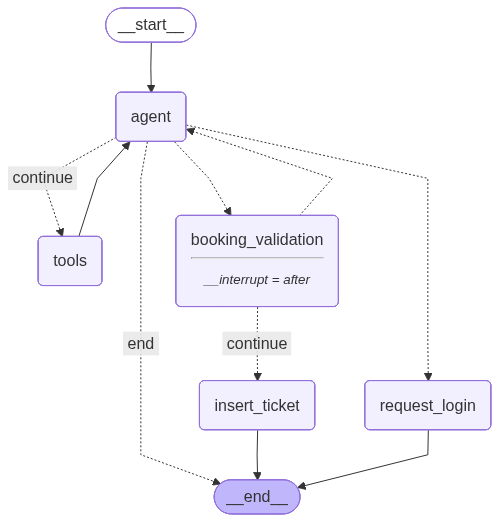
checkpointer = MemorySaver()
langgraph_app = await create_graph(checkpointer, model)
Graph nodes
Single-responsibility nodes
agent_node
Calls the LLM with the current message history and determines the next action.
tool_node
Executes tool calls returned by the agent through the MCP server.
booking_validation_node
Validates flight information and asks the user to confirm before a ticket is inserted.
insert_ticket_node
Performs the actual ticket insertion after the user confirms the booking.
request_login_node
Returns a login-required response when an authenticated tool is called without a valid token.
Chat flow
Readable decision flow
User Input
agent_node
LLM processes the current message history.
agent_should_continue()
Determines whether tools or direct completion are required.
tool_node
Executes regular MCP tools.
booking_validation_node
Validates and requests confirmation for ticket insertion.
insert_ticket_node
Creates the ticket after confirmation.
Human-in-the-loop
Booking confirmation
Before a ticket is inserted, the graph validates the flight information and pauses the workflow. The user can confirm or cancel the operation before the final database mutation.
Project structure
Organized around clear responsibilities
docker-compose.ymlPostgreSQL + pgvector container
pyproject.tomlProject dependencies managed with uv
mcp/FastMCP server and authentication middleware
helper/LLM prompt template
agent.pyLangGraph nodes, edges, and state
Getting started
Local-first development
The project is designed to run locally using uv for Python dependency management and Docker for PostgreSQL with pgvector.
uv venv --python 3.12
source .venv/bin/activate

uv sync

cp .env.example .env

docker compose up -d
cd mcp
uv run python server.py

# Server
http://127.0.0.1:8150

# SSE
http://127.0.0.1:8150/sse
# LLM API Keys
GEMINI_API_KEY=your_gemini_api_key
GROQ_API_KEY=your_groq_api_key

# Auth
SECRET_KEY=your_jwt_secret
ALGORITHM=HS256

# PostgreSQL / pgvector
POSTGRES_USER=postgres
POSTGRES_PASSWORD=postgres
POSTGRES_DB=cymbal
POSTGRES_PORT=5432
Development workflow
Jupyter notebooks
The agent and chat interface are currently developed and executed through notebooks in a deliberate sequence.
1_preparation.ipynb
Database setup, table creation, and data loading.
2_agent.ipynb
Initializes the LangGraph agent and checkpointer.
3_chat-interface.ipynb
Interactive chat session and main entry point.
1_preparation.ipynb once to seed the database, then use the agent and chat notebooks for day-to-day development.Testing
End-to-end agent scenarios
Agent behavior is validated through dedicated notebooks. Each scenario creates its own thread ID and authentication token so tests remain isolated from each other.
Technology
Modern AI agent stack
Readable agent architecture, built for iteration.
Cymbal Air Assistant demonstrates how a complex conversational workflow can be decomposed into explicit, testable LangGraph nodes while keeping infrastructure local and maintainable.