
How EasyOCRactually works.
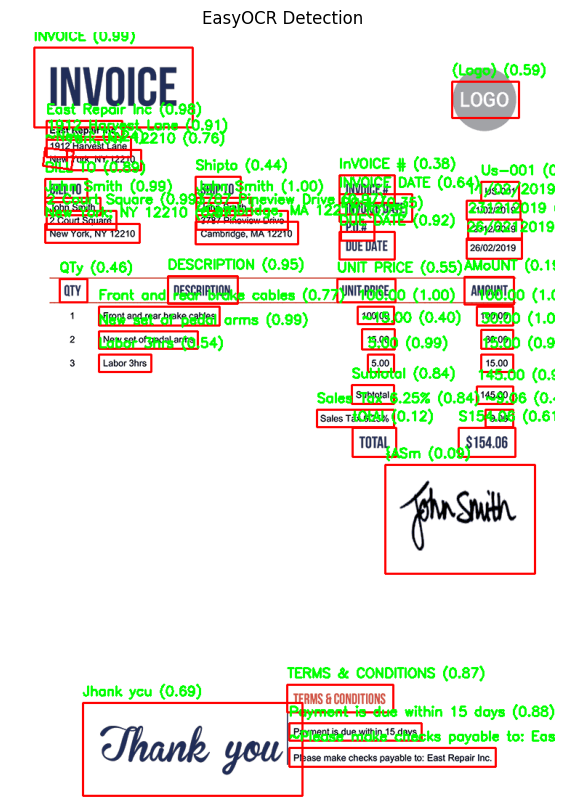
An end-to-end walkthrough of EasyOCR internals, from CRAFT text detection and bounding-box postprocessing to VGG-based recognition and CTC decoding.
Final inference
Text detection and recognition
The motivation
Understand the implementation, not just the API.
EasyOCR makes text extraction straightforward through a single inference interface. This project opens up that interface to understand how image pixels eventually become recognized text.
Each notebook isolates a component of the pipeline, making intermediate tensors, score maps, thresholds, box matching, and decoder behavior easier to inspect and experiment with.
Browse the notebooksDetection internals
Explore CRAFT score maps, thresholding, connected components, and text-box generation.
Threshold experiments
See how changing low_text affects active pixels and candidate text regions.
Recognition internals
Inspect the VGG-based recognizer, feature sequences, and character predictions.
Decoder comparison
Study greedy search, beam search, word beam search, and repeated-character handling.
01 / Pipeline overview
From pixels to recognized text
The inference process is a sequence of detection, geometric postprocessing, region preparation, recognition, and decoding.
Image preprocessing
Resize the input image, preserve its aspect ratio, normalize pixel values, and convert it into a tensor.
CRAFT detection
Predict character-region and affinity scores to identify text regions and connections between neighboring characters.
Postprocessing
Apply thresholds, extract connected components, estimate bounding boxes, and group nearby detections.
Region cropping
Crop detected text regions and transform them into inputs that the recognition model can process.
Text recognition
Pass each cropped region through the VGG-based feature extractor and sequence prediction layers.
CTC decoding
Convert timestep-level character predictions into readable text using greedy search, beam search, or word beam search.
Detection and recognition are separate tasks
CRAFT determines where text is located. The recognition model determines what that text says.
02 / Text detection
CRAFT: detecting text at the pixel level
CRAFT predicts two score maps that help identify character regions and the affinities connecting characters into words.
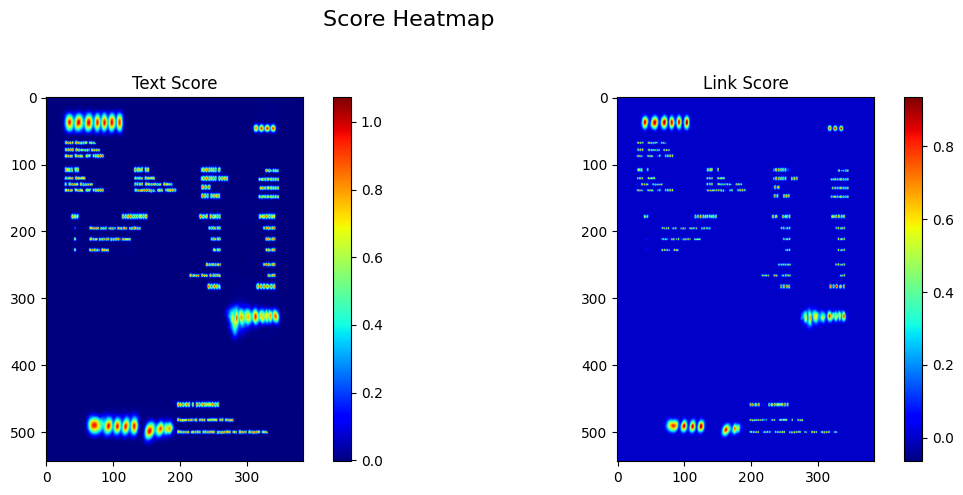
Text score
Estimates how likely each pixel belongs to a character region. High-scoring pixels form the foundation for detecting text components.
Link score
Estimates the affinity between neighboring characters. These connections help the postprocessing stage group characters that belong to the same word.
Key insight
The detector does not directly output the final recognized text. Its score maps must first be converted into geometric text regions.
03 / Threshold analysis
How does low_text change detection?
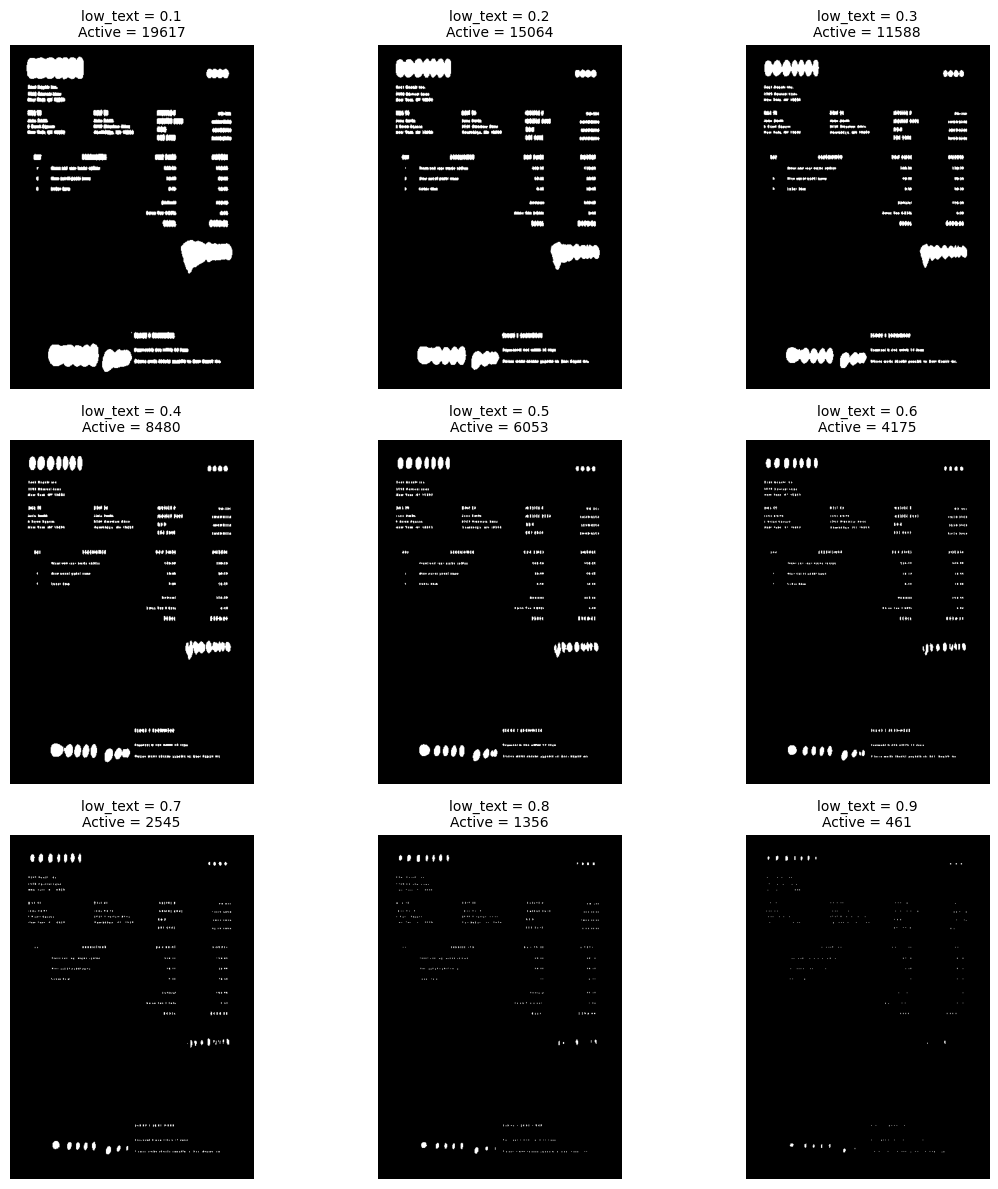
Thresholding converts continuous score maps into binary regions. Experimenting with low_text reveals how sensitive candidate text regions are to this parameter.
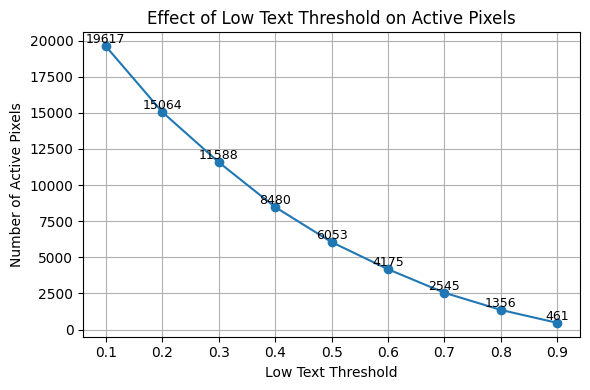
Low-text threshold vs. active pixels
The low-text threshold determines which pixels are eligible to participate in candidate text regions. Lowering the threshold can retain weaker responses, while raising it can remove faint regions.
text_score > low_text
Conceptual thresholding rule. Actual box generation also depends on link scores, connected components, and subsequent filtering.
Low threshold
A lower threshold can activate more pixels, revealing weaker text regions but potentially introducing noise.
Connected regions
Active pixels are converted into connected components that become candidates for text boxes.
Final boxes
Candidate regions are filtered and grouped according to their geometry and neighboring text relationships.
Note: the exact pixel counts and threshold values should be interpreted from the plotted experiment, rather than assumed from the parameter name alone.
04 / Detection postprocessing
From score maps to bounding boxes
After thresholding, EasyOCR converts candidate pixels into connected components, estimates text geometry, and matches or groups regions before recognition.
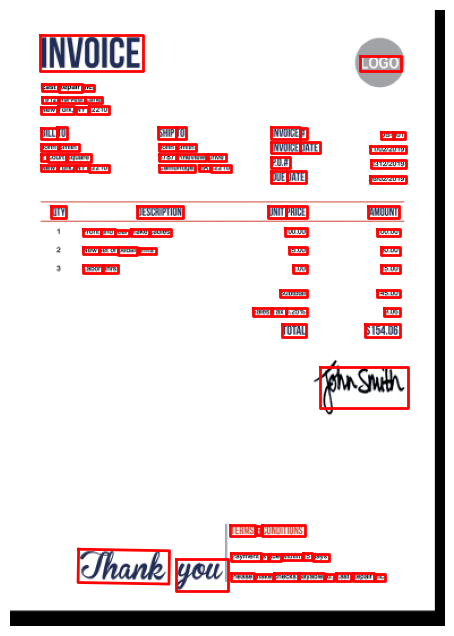
What happens here?
- Extract connected components from the thresholded score maps.
- Estimate bounding boxes or polygons around candidate regions.
- Match neighboring components when they likely belong together.
- Group text boxes into suitable recognition regions.
Why are boxes matched?
Text does not always appear as one clean connected region. Characters may produce separate components, and neighboring text may need to be grouped. Postprocessing uses geometry and connectivity to form useful regions for recognition.
Not every candidate should be merged. Incorrect grouping can combine separate words, while insufficient grouping can fragment a single word into multiple regions.
The output is still geometry
At this stage, the pipeline has candidate text regions and their coordinates. The actual characters are predicted by the recognizer in the next stage.
05 / Text recognition
Each detected region becomes a sequence
Once text regions are prepared, the recognizer predicts a sequence of character probabilities for each crop.
Crop
Extract each detected region from the original image.
Normalize
Resize and normalize the crop to match recognizer input requirements.
Predict
Generate a sequence of character scores across feature timesteps.
English Generation 2 recognizer
This walkthrough inspects the English Generation 2 recognition model, including its VGG-based feature extractor, sequence modeling, prediction layer, and CTC output probabilities.
06 / Sequence decoding
CTC turns predictions into text
The recognizer emits character probabilities over timesteps. CTC decoding converts those predictions into a readable character sequence.
Model output
Timestep predictions
A sequence of probability distributions over the character vocabulary, including the CTC blank token.
Decoder output
Recognized characters
Collapse repeated labels and remove blank tokens to obtain the decoded sequence.
Three decoding strategies explored
Greedy search
Select the most likely character at each timestep before collapsing the sequence.
Beam search
Maintain multiple candidate paths to explore alternatives beyond a single greedy path.
Word beam search
Use word-level constraints to guide decoding toward plausible word sequences.
Why inspect the decoder?
Repeated characters, blank-token removal, confidence calculations, and beam-search behavior all affect how timestep predictions become the final text. The notebooks also investigate CTC-related decoding behavior.
07 / Final result
The complete inference output
The final result combines the geometry from text detection with the recognized text and its associated confidence score.
Bounding boxes
Coordinates define the detected text regions in the image.
Recognized text
The recognition and decoding stages produce readable strings.
Confidence score
A confidence value accompanies each recognition result.
Explore the implementation
Learn EasyOCR from the inside out.
Explore the notebooks covering preprocessing, CRAFT inference, box postprocessing, recognition, and CTC decoding. Each experiment focuses on making one part of the pipeline observable and understandable.